
Modern template
Modern Cleaning
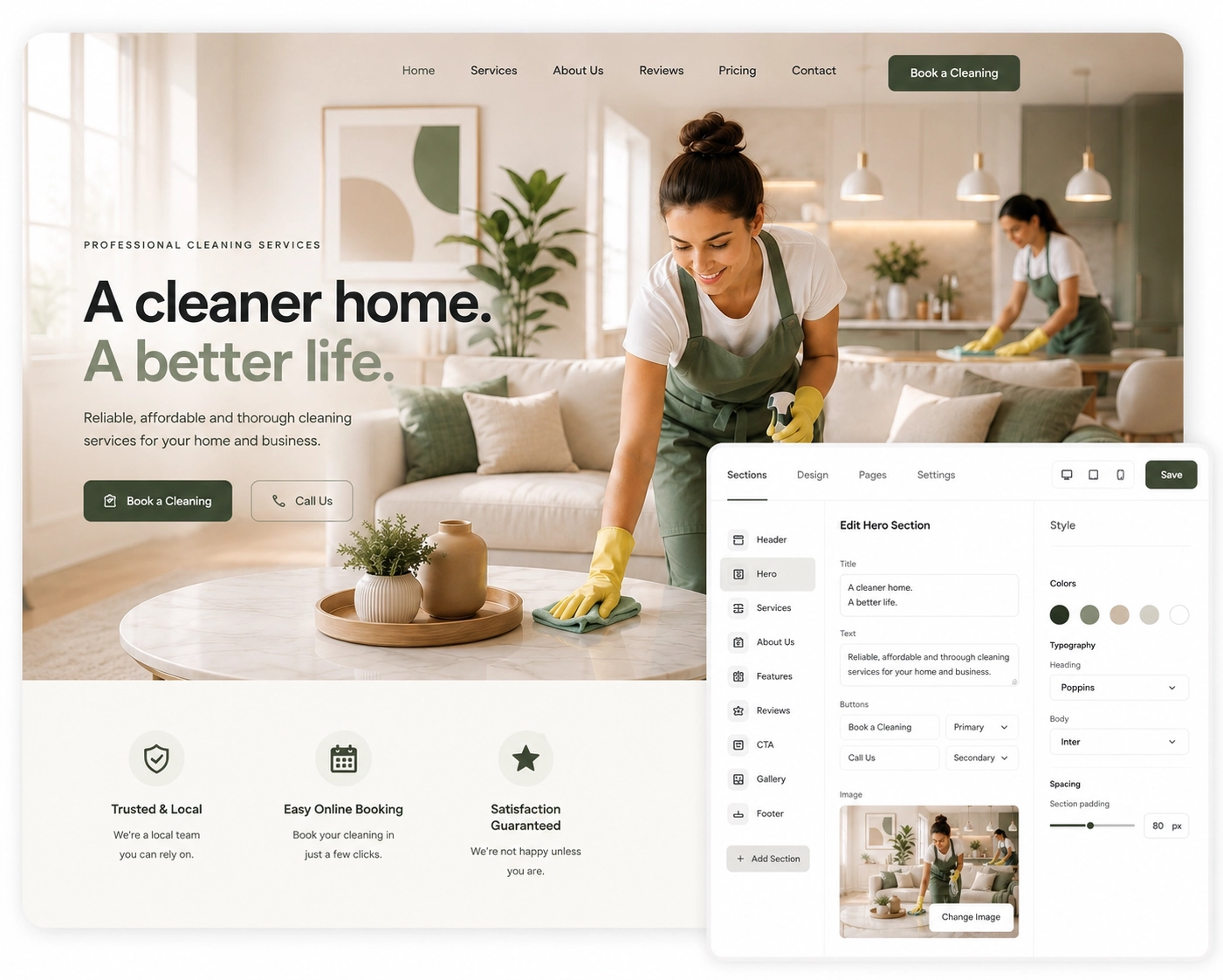
A modern cleaning website with clear service presentation, strong calls to action, reviews, service areas and online booking.
Build a professional cleaning website with your own domain, ready-made templates, visual editing, local landing pages and Cleanwich tools already connected.
The walkthrough covers website settings, templates, theme controls, pages, navigation, service and location landing pages, media, SEO and the visual editor.
The video will be added here after recording.
Select a template, activate the pages you need and organise the navigation.
Update sections, colours, text, buttons, images and modules without touching code.
Booking, reviews, gift cards, callbacks and marketing tools work with the provider account.
Every template already includes the structure a cleaning business needs: services, local areas, trust content, reviews, customer actions and online booking.
Select a section, change its content or design and review the result inside the actual page. Cleanwich Sites keeps the responsive structure protected while giving the business practical control over how the website looks and works.
Text, images, buttons, links, badges and customer-facing content.
Colours, spacing, cards, buttons, borders and visual emphasis.
Add, hide and reorder sections without rebuilding the whole page.
Select any section and change its colours, buttons, cards, spacing and visual emphasis without affecting the rest of the page.
Change backgrounds, text, accent and button colours.
Adjust supported card, border and button styles.
Control spacing and presentation for the selected section.
The structure remains consistent while each section can be adapted to match your brand, highlight important content and create stronger contrast across the page.
Select a section, update its content and see the result inside the real page preview before anything is published.
The complete page remains visible while you work, so there is no need to edit settings blindly and then open the public website to discover the result.
Update headings, supporting text, buttons, links, badges and other customer-facing content.
Change section photography and immediately see how the new image works with the surrounding content.
Check the finished page inside the preview before saving changes or making them public.
Launch a new service, publish an offer, add more social proof or connect another customer tool without replacing the website.
Add the right module when the business changes instead of commissioning a new page or rebuilding the entire website.
Control the order of every page so the most important services, reviews, areas and booking actions appear at the right moment.
Drag sections into a new order without rebuilding the page.
Temporarily hide seasonal, unfinished or currently unnecessary sections.
Bring hidden content back with its settings and content still saved.
You decide what visitors see first, what builds trust and where the page should lead them next.
Switch between desktop, tablet and mobile previews to check how the same page will look on every device before publishing changes.
You can publish with confidence knowing that important content, navigation and booking actions remain usable on desktop, tablet and mobile.
Manage the company identity, contact details, social links, opening hours, website status and connected Cleanwich modules from one settings area.
Company name, logo, favicon, phone, email, address and social links.
Use maintenance mode while updates are being prepared.
The correct Cleanwich provider account is used automatically.
Name, phone, email, address
Logo, favicon, touch icon
Public business schedule
Temporarily hide public website
Cleanwich Sites includes the structure cleaning businesses need to explain services, target local areas and guide visitors into booking or enquiry.
Home, About, Services, Reviews, Contact, Booking, Gallery, FAQ, Gift Cards and legal pages can be activated and ordered without building a menu from scratch.
Create dedicated pages for regular cleaning, deep cleaning, end of tenancy, office cleaning and every other service the provider wants to promote.
Cities, towns, districts and other service areas can each have their own structured page and local booking call to action.
Edit the page title, menu label, URL, search title, search description, publication status and navigation visibility independently.
Manage logos, hero images, service graphics, favicons and the public work gallery from one media area.
Logo, favicon, hero imagery, service images and section graphics.
Completed jobs, before-and-after photos and real cleaning results.
Uploaded images are prepared for reliable website display.
Create cleaning guides, local articles, service advice and company updates directly inside Cleanwich Sites. Everything stays connected to the website, its design, navigation and SEO structure.
Articles are assembled from clear content blocks, so users can create well-structured pages without working inside a complicated technical editor.
Add the type of content you need and arrange it in the correct order. The website handles the presentation, spacing and article structure automatically.
Publish service guides, local cleaning advice, customer checklists and company updates that support the wider website content strategy.
Whether you're redesigning your website, replacing content or carrying out maintenance, visitors never have to see a broken page or server error. Cleanwich automatically displays a professional branded maintenance page that keeps your business open for new customers.
Customers can still reach your live Cleanwich booking page even while your website is temporarily unavailable.
Call, email and enquiry actions remain available, so customers can still contact your business while improvements are in progress.
Visitors see a branded maintenance page that reassures them your business is still operating normally.
Even while your website is being redesigned or updated, customers can still book online, call your business or send an enquiry. Instead of losing visitors, you continue generating bookings until the new website is ready.
Cleanwich Sites removes the gap between the public website and the software used to manage customers, bookings and marketing.
A visitor finds a service page, checks the provider, opens the booking form or enquiry tool, and the customer action reaches the same Cleanwich provider account.
Booking, reviews, gift cards, callbacks, newsletter capture and marketing tools can be enabled from the connected platform.
The editor exposes useful content and design controls while keeping the professional page structure protected.
The provider can grow the website gradually without replacing the whole system or starting again.
Cleanwich Sites combines templates, visual editing, pages, local SEO structure, media and connected customer tools in one managed platform.

We’ll take you to the selected country’s page for this section.
We use cookies to ensure that we give you the best experience on our website. Read cookies policies.
Required for website functionality. Always enabled.
Help us improve your experience.


