
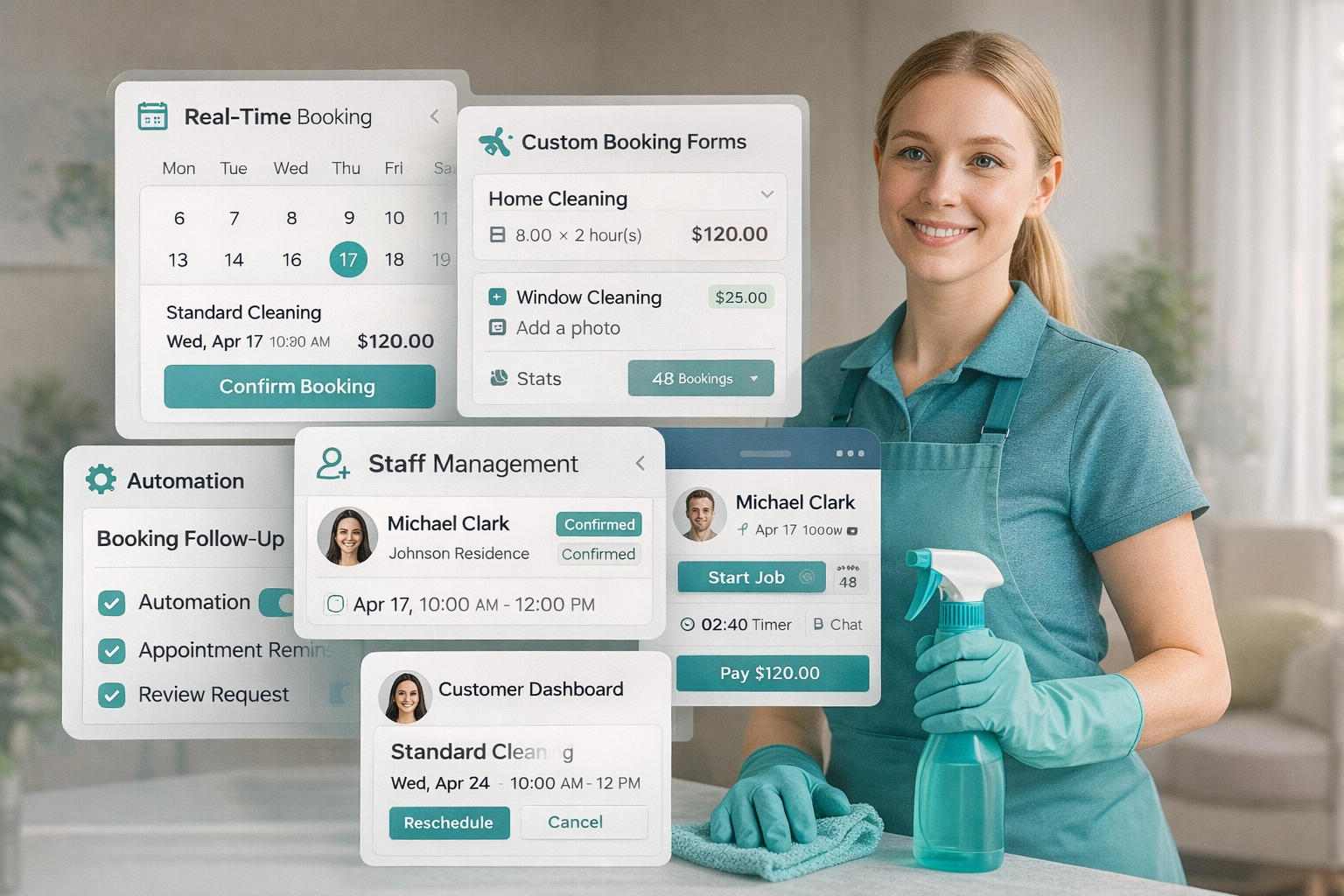






Features explained
Let customers book online with pricing rules, availability, payments, and automation.
Get discovered by local clients and build trust with a public business profile.
Find cleaners in your area and manage staff scheduling and job progress.
Attract high-intent local clients who come to Cleanwich ready to request a quote or book.
Get discovered by local clients, build trust, and show your business professionally.
Directory
The Public Company Profile is a dedicated, public-facing page that represents your cleaning business inside the Cleanwich directory.
It acts as a mini-website for your company, allowing potential customers to learn about your services, availability, and credibility before booking.
Upload your company logo and banner images to visually brand your public profile.
Display key business details such as company name, address, contact details, years in business, and team size.
Define your service areas and working hours so customers clearly understand where and when you operate.
Add a business description, list offered services, and answer common questions using the built-in Q&A section.
Showcase result photos and link your social media profiles to build trust and improve visibility.
The profile is fully public, indexable, and can be shared or used as a standalone mini-site if you don’t have your own website.
Pricing
This feature allows you to define fixed prices and calculation rules for each service, which are then used to calculate the final price automatically based on property details.
The calculator is used inside the public directory, where customers can select a service, property size, and extras to see a live price before choosing a provider.
Prices are configured per service using structured options such as rooms, bathrooms, property type, and additional extras.
The final price is calculated instantly as selections change, using your predefined pricing logic.
These prices are displayed in the directory, allowing customers to compare providers transparently without contacting anyone.
This is not a booking form — it is a discovery and comparison tool designed to set clear expectations upfront.
Directory
Contact Requests provides a built-in enquiry form for each public company profile, allowing customers to reach out without booking.
This form lives on the provider’s mini-site and can also be embedded as a widget on external websites.
Customers submit service-specific enquiries with priority, message, and optional property details.
All requests are stored inside the provider dashboard with full context: service type, contact details, priority, and message history.
This channel is designed for pre-booking communication — questions, custom jobs, or complex requests.
Contact Requests integrate with widgets, directory pages, and the provider’s public profile automatically.
Convert visitors into confirmed bookings with smart forms, scheduling, payments, and automation.
Booking System
Let customers book in seconds without calling or waiting. Your form calculates price, shows real-time availability, and collects all details you need to confirm the job.
Real-time pricing based on service, property size, and extras
Custom fields, checklists, and optional multi-step layout
Works as a standalone Cleanwich mini-site or as an embed on your website
Booking System
Track bookings across your team, prevent conflicts, and control time slots with capacity rules.
Conflict-free scheduling with availability and overlap detection
Time slots with capacity limits (1, 2, 3+ jobs per slot)
Arrival windows or exact time your choice
Booking System
Control how you get paid. Accept card, cash, or bank transfer, take deposits when needed, and apply cancellation fees based on your own policy.
Multiple payment methods: card, cash, and bank transfer
Deposits and cancellation fees configured per service to reduce no-shows
Stripe integration for secure card payments and provider-controlled charging
Booking System
Collect verified customer reviews automatically after completed bookings and turn real feedback into trust, social proof, and higher conversion rates without manual follow-ups or third-party tools.
Reviews are always linked to real bookings, ensuring authenticity and protecting your profile from fake or misleading ratings.
Review requests are triggered after a job is marked as completed, keeping feedback tied to real work
Only verified customers can leave reviews, preventing fake ratings and review abuse
Ratings and written feedback are displayed on your public profile and widgets to build trust before contact
All reviews are managed in one place, making it easy to track satisfaction and spot recurring issues
Booking System
View and manage every booking from one place. Edit details, update status, reschedule jobs, and keep a clear history of what happened and when.
Full booking details in one view: service, extras, address, client notes, and pricing
Status control: confirm, complete, cancel, and track changes across the booking lifecycle
Rescheduling without chaos: update date/time and keep the booking record consistent
Internal notes per booking so staff always knows special instructions and access details
Booking System
Keep your team organised with staff profiles, availability control, and job assignments. You can assign cleaners to bookings and keep job-related notes in one workflow.
Staff profiles with role-based access and basic details for day-to-day operations
Availability control so the booking system only shows times you can actually fulfil
Assign staff to bookings to make responsibility clear and reduce missed jobs
Job notes and internal comments to capture what matters for repeat clients and special cases
Booking System
Every client has a profile with booking history and key details, so you can deliver consistent service, recognise repeat customers, and avoid re-asking the same questions.
Booking history and service patterns visible at a glance
Notes per customer for access instructions, preferences, and recurring issues
Better team coordination: staff sees the right context before starting the job
Cleaner communication: fewer misunderstandings and fewer repeated questions
Booking System
Set your weekly working days and booking time slots. You can control how many jobs can be booked per slot and block specific times or dates when you’re unavailable.
Weekly schedule per day: mark each day as Open/Closed and manage it independently
Time slots or time ranges: add start times or ranges (e.g. 09:30 or 09:30–10:30)
Capacity per slot (Jobs max): limit how many bookings can be taken at the same time
Better customer expectations: offer arrival windows or exact times depending on your workflow
Booking System
Build your service catalogue the way your business actually sells. Define what you offer, how pricing is calculated, and what options customers can choose during the booking flow.
Create multiple services with different logic: deep cleaning, end of tenancy, builders clean or recurring services
Define units and size parameters like bedrooms, bathrooms, receptions, floors, or anything you need
Add extras and add-ons with fixed pricing or quantity-based rules to increase average order value
Control pricing logic and calculation parameters per service / rooms etc
Booking System
Automatically adjust service prices based on weekdays, time slots, or specific dates. This allows you to respond to demand, holidays, or peak hours without changing your base pricing.
Time-based rules by weekday and time slots (e.g. weekends or peak hours)
Date-specific price rules for holidays, special days, or seasonal demand
Apply fixed amount or percentage adjustments per rule
Rules are applied automatically during price calculation
Booking System
Offer automatic discounts for recurring services to keep customers coming back. You can set weekly, bi-weekly, bi-monthly, or monthly discounts and apply them consistently without manual work.
Built-in frequencies: weekly, bi-weekly, monthly, and bi-monthly
Discount type can be percentage or fixed amount per frequency
Control how recurring bookings are generated using booking count and week interval
Helps increase retention by rewarding customers who book regularly
Booking System
Control your booking emails and keep communication consistent. Set your sender details, connect SMTP, and enable or disable notifications for customers, staff, and admin alerts.
Configure booking and support emails plus your sender name for branded communication
SMTP settings let you send emails from your own domain and test the connection
Templates separated for company, customers, and staff with preview and edit controls
Toggle notifications for key events like approvals, cancellations, reschedules, reviews, and payment alerts
Booking System
Send real-time SMS updates for booking events. Connect your Vonage account (formerly Nexmo), choose who receives messages, and enable phone verification to reduce fake requests.
Vonage integration with API key and secret to enable SMS delivery
Control SMS recipients: customers, company, and staff notifications
SMS templates separated for company, customers, and staff with editable events
Optional phone verification during booking to confirm the customer’s mobile number
Booking System
Give customers a simple code they can enter during checkout to get a discount. You decide how much the discount is, how long it lasts, and which services it can be used for.
Set the discount as a fixed amount off (e.g. £25 off) or a percentage (e.g. 10% off)
Limit usage so the code can’t be abused (for example: only 90 uses in total)
Add an expiry date so the offer stops automatically when your campaign ends
Choose exactly which services the code applies to (so discounts don’t affect everything)
Optional setting to allow the same code for returning customers only
Marketing
Let your customers bring you new clients. When someone recommends your business, the new customer gets a discount and the person who referred them earns a reward.
Turn the referral system on and set how much a referrer earns for each successful referral
Set the discount given to the new customer so they’re more likely to book the first time
Control payouts with a minimum withdrawal limit so rewards aren’t cashed out too early
Choose how rewards can be used: paid out (bank transfer/cheque) or applied toward future bookings
Optional rule to allow referral discounts to be combined with promo codes
Booking Control
Control exactly where customers are allowed to book your services. Coverage settings prevent bookings from areas you don’t serve, saving time and avoiding unwanted jobs.
Enable coverage to accept bookings only from postcodes you explicitly define
Add cities and districts step by step, down to area, district, or sector level
Instantly enable or disable coverage for specific locations without deleting data
Show a custom message to customers when their postcode is outside your service area
Sales & Retention
Sell or issue gift cards that customers can redeem through your online booking form. Gift cards help you generate upfront revenue and bring new customers through recommendations.
Enable gift cards and set a minimum amount to control their value
Choose from multiple ready-made card designs for different occasions
Customize recipient emails, redeem instructions, and support contact details
Issue free gift cards manually for refunds, promotions, or customer rewards
Track all issued cards, remaining balances, usage history, and card status in one place
Marketing
Review Rewards allows you to request customer reviews after a booking and optionally reward positive feedback with a gift card.
The review request is triggered once a booking is marked as Completed. You choose how this process works using two available modes:
Automatic mode — the review request is sent automatically after the booking is completed, using the configured buffer time.
Manual mode — you manually send the review request from the booking and decide when to issue the reward.
You define the minimum star rating required to qualify for a reward (for example, 4+ or 5 stars).
Set the gift card amount and an optional minimum booking value to control when rewards apply.
Choose the gift card design that will be sent to the customer once the reward is issued.
Marketing
Grow your customer base by collecting email subscribers directly from your website, booking forms, popups, or public profile — all styled to match your brand.
Newsletter subscription works as a simple, non-intrusive way to stay connected with potential customers who are not ready to book yet, but want to hear from you later.
Subscription forms can be displayed on booking pages, popups, widgets, or your public company profile
All subscribers are stored in your dashboard, showing where they came from and when they signed up
You connect your own email marketing platform* and continue sending campaigns using your usual tools
Subscriber lists can be easily exported or connected to popular email marketing tools you already use
Unsubscribes are respected automatically, keeping your list clean and compliant
Marketing
Marketing Popup is a configurable on-site popup that appears on your website or booking widgets to capture leads, promote offers, or collect newsletter subscriptions.
You control when the popup is shown and what type of content it displays.
Choose when the popup appears — immediately on page load or when the visitor attempts to close the page.
Select the popup content type: a custom message, a promotional offer with a promo code, or a newsletter subscription form.
Design, colours, layout preset, images, and button behaviour are fully configurable by the provider.
When used as a subscription form, collected emails are stored in the provider dashboard and can be synced to external email platforms.
Communication
Call Back Requests allows customers to request a call directly from your website, booking widgets, or public profile.
Requests are collected in a single dashboard where you can track status and follow up.
The request form can be displayed as a popup button or embedded inline on a page.
You define available days, time ranges, request reasons, and form appearance.
Notifications for new requests can be sent via email or SMS, depending on your settings.
Each request can be marked as completed, allowing you to track pending and handled calls.
Staff Portal
Give your cleaners their own simple portal, so they always know what’s next, what to do on-site, and what they’ve already completed. Less back-and-forth for you, fewer mistakes for the team.
A personal dashboard with upcoming jobs, arrival time, job details, and assigned salary
In-job controls: Start / Pause / Finish with clear service status and elapsed time
Built-in checklists and job notes so the cleaner follows your standard every time
Payments view for staff: earnings summary, tips/bonuses, payment history, and job breakdown
Holiday & availability: staff can block dates off — you instantly see it in scheduling
Website Integration
Widgets & Embeds let you place Cleanwich functionality directly on your own website using simple embed scripts.
Each widget is generated automatically and can be copied and pasted into any page without custom development.
Embed booking forms, contact forms, callback requests, gift card forms, newsletter signup forms, and special offers.
Display customer reviews using review widgets or a rotating reviews carousel.
Use popup widgets to show marketing messages, offers, or lead capture forms on page load or exit intent.
Add trust badges such as rating badges or QR badges to link visitors directly to your Cleanwich profile.
Optional visitor analytics scripts allow you to track widget usage and interactions from your website.
Find cleaners locally and manage your team with staff tools built into the platform.
Job Board
The Job Board helps you discover cleaners who are actively looking for work in your area. If cleaners are available in your city, you’ll see them listed inside your dashboard.
Cleaners create their own profiles and specify availability, job type (full-time, part-time, on-demand), and experience.
Only cleaners located in your service city are shown, keeping results relevant and local.
You can open a cleaner’s profile to review skills, preferences, availability, and background details.
Contact is initiated directly from the profile using a built-in contact form — no public emails or phone numbers required.
If no cleaners are available in your area, the Job Board simply stays empty — nothing is forced or simulated.
Hiring
Vacancies allow you to publish your own job listings and hire cleaners directly through the Cleanwich platform.
Each vacancy is displayed in the public job directory and shown to candidates searching for cleaning jobs in your selected location.
You create a vacancy by defining the job title, description, pay rate, employment type, schedule, and location.
The vacancy is published in the Cleanwich directory and becomes visible to local candidates on the platform.
You can enable an application form, allowing candidates to apply directly from the vacancy page.
All applications are collected in your dashboard with full access to candidate profiles, experience, skills, and contact details.
You review applications, contact candidates, and manage the hiring process directly from the platform.
Capture more enquiries and bring customers back with built-in marketing tools.
Leads Generation
Local Job Requests allow you to receive direct cleaning leads from customers searching for services in your area.
A customer submits a job request by selecting a service and providing property details such as rooms, bathrooms, and additional options.
Each job request is published to a local job feed and shown only to providers operating in the relevant service area.
You can review job details, submit your own quote, and decide whether to engage with the request.
Once you submit a quote, you can communicate directly with the customer without intermediaries.
Leads are completely free — Cleanwich does not charge for access, bidding, or customer contact.
You stay in full control of pricing, communication, and whether you proceed with the job.
Enter your estimated turnover to see Cleanwich cost and potential savings instantly.
Enter your estimated turnover per month
and click Calculate to see results
Real feedback from cleaning professionals using Cleanwich
Cleanwich is such a good idea, there was a huge gap in the market for an online booking system for cleaners. It's something I've dreamed about having,...
Best Maids
I’m a self-employed cleaner and only started using Cleanwich about a month ago. At first I wasn’t sure if I even needed an app, but I’m honestly glad...
Tidy Hell
Very satisfied with the Cleanwich platform it's a great tool for my cleaning business. The system is easy to use, helps attract new customers, and mak...
MintyMaids
I run my own cleaning business, and honestly, I didn’t expect that a booking form and other features provided by the Cleanwich app could have such a p...
Gleamo
Watch short walkthroughs: booking, billing, provider dashboard & payouts.
You don’t pay per booking manually. Instead, you top up your account balance via card in your dashboard — any amount you choose.
Then, every time a new booking is made through the Cleanwich system, the commission is automatically deducted from your balance.
You stay in full control, and nothing is charged without your knowledge.
We take that seriously. Cleanwich gives you multiple ways to protect your time and avoid fake clients:
We also recommend setting deposits or cancellation fees for extra protection.
Absolutely — and it takes less than a minute.
We’ve created a ready-to-use booking widget that you can easily embed into your website. Just copy the code from your dashboard and paste it into your site’s HTML — that’s it. No developers, no stress.
You can also add:
Your Cleanwich tools aren’t just powerful — they’re flexible. Use them anywhere your business lives online.
Yes! Every new provider gets a 7-day free trial to explore all features of Cleanwich — no limitations. You can test the booking system, profile setup, lead generation tools, and everything else without any charge.
To activate your trial, you'll be asked to enter your payment card details, but you won’t be charged immediately. After 7 days, your card will automatically be charged £5/month to continue your subscription — unless you cancel before the trial ends.
✔ No risk, no hidden fees, and you can cancel any time directly from your dashboard.
Let’s be honest — we’re not just “another booking app” or directory. We’ve built something fundamentally different:
Cleanwich isn’t a tool. It’s a complete Operation Ecosystem for Local Businesses (OELB) — a model we created to support the entire workflow of modern service providers.
Other platforms either charge you for leads, flood you with competitors, or give you half-baked booking tools.
Cleanwich gives you:
Truth is, we don’t really have competitors.
There’s just no other platform built like this — for your business, not theirs.
Everything you need to run and scale your cleaning business in one modern platform.
Offer clients a smooth 24/7 online booking experience no calls or back-and-forth. Customize services, pricing, scheduling, frequency, and forms to match your workflow.
Be visible to clients actively seeking cleaning services nearby. Get a public profile where they can find, compare, and book you directly no middlemen, no hidden fees.
Post job openings and browse a list of cleaners actively looking for work in your area. Connect with potential hires, manage applicants, and grow your team with ease.
Clients come to Cleanwich looking for cleaning services which means every lead you get is high intent, local, and ready to book. No wasted budget, just real demand.
+ 0.5% commission per one-off booking
0.1% per recurring service
Cancel anytime. No hidden fees.
We use cookies to ensure that we give you the best experience on our website. Read cookies policies.
Required for website functionality. Always enabled.
Help us improve your experience.